Score Only
Tap who won each game. Keep score without charting individual points.
How it works · Match charting
Keep the score game by game, or chart individual points in more detail. Choose the depth that lets you stay with the match.
A match record you can bring to your coach.

At the court / In the app
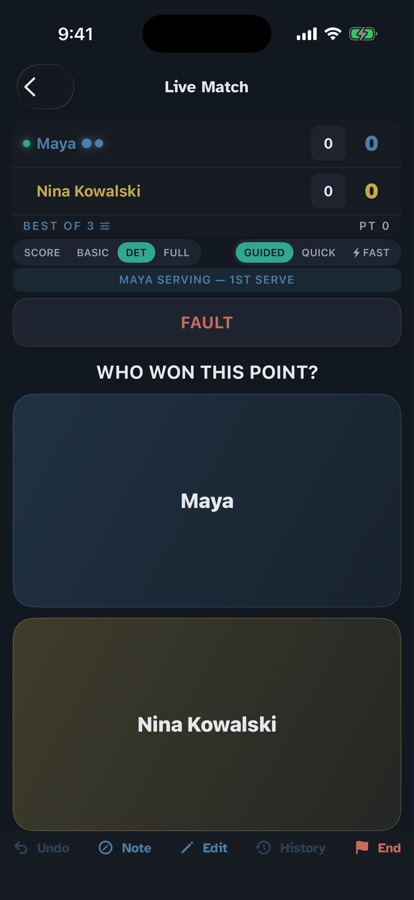
Keep score, or add point details. Change depth during the match.
Tap who won the point. The buttons name each player.
01 / Before the first serve
Choose up to three things to work on together. This step is optional.
After each set, reflect on how well they stayed with the plan—not whether they won.
02 / During the match
Score Only keeps score game by game. Basic, Detailed and Full record points. You can change depth mid-match.
Tap who won each game. Keep score without charting individual points.
Record points: capture the serve and how each point ended.
Add shot type, direction, and rally length to the point record.
Add placement and optional charted mental state. Connected staff can see that field.
One point. Something worth remembering.
An illustrative match story, from the stands to the next conversation with your coach.
The opponent missed, but the forehand helped create that miss. In Detailed or Full charting, you can keep the forcing shot in the record.
Record what you saw. You can simplify the charting depth at any time.
“When is the wide forehand creating an opening?” Your coach can review the match record after your family confirms the connection, and choose what to work on.
Return to later matches together: is that pattern showing up again? One point starts a question; later records help you explore it.
03 / After the last point
Bring the match record to your coach, who chooses the practice focus. Revisit later matches together to see what’s changing. Keep how it felt in your family’s private reflection.
Match data gives a connected coach context. Family journals and reflections stay private.
See what your coach can see“What felt different
out there today?”
An illustrative prompt. Your family’s reflections remain yours.
See it happen
A silent app walkthrough, from match setup to point capture.
Your observations, with a clear boundary
For the details
Open a topic for the full explanation.
Focus, recording depth, and the parent’s perspective
Before the match, you and your child pick up to three things to focus on. Not goals. Not a scoreline. Focuses — the handful of things that actually matter for this match. It mirrors the pre-match talk you already have walking to the court, and it turns that conversation into the frame the whole match is charted against.
Free text, one line each, fully optional. "No focuses this match" never blocks you from charting — it's a ritual, not a requirement.
Then, after each set, you rate one thing about each focus — how well they held it:
Notice what that question is, and what it isn't. It's "did they stick to the plan," never "did they win the point" or "did it work." A kid can stick to their first-serve targets and still get passed. They stuck to it. That's the thing worth seeing, worth saying on the drive home, and worth building on next week.
This is the eyes-forward mindset made literal. Every other number in CourtSide describes what happened on the court. Focuses describe your plan for your child — and rating them on commitment instead of outcome is the whole philosophy in one screen. You're not measuring them against the scoreboard, or against the kid across the net. You're measuring them against the path the two of you chose. That's the path Proverbs is talking about.
CourtSide organizes charting around your child. Prompts identify your player and the opponent, so you can follow the point without keeping a separate mental tally of whose shot you are recording.
Your child’s shots, the opponent’s response, and the outcome become a record you can review together. The parent brings observations; the coach decides how to use them.
Score Only records games: tap who won each game. You keep the match score without entering individual point details.
Basic, Detailed, and Full record points. Basic captures the serve and outcome. Detailed adds shot type, direction, and rally length. Full adds placement and optional charted mental state.
You can change depth during a match. The record keeps the detail you already entered; changing depth does not fill in information you did not chart.
Outcomes, forcing shots, and direction
In the point-charting modes, start with who won the point. Then record the outcome and the detail that your chosen depth asks for. A winner, an unforced error, and a forced error describe different parts of the point.
The prompts name your child or the opponent. At the deeper levels, shot type and direction help you remember how the point unfolded.
Your child hits a forehand that pulls the opponent wide. The reply goes into the net. In Detailed or Full charting, record the forced error and your child’s forcing shot. That keeps the forehand in the record alongside the opponent’s miss.
This is an illustrative point, not a claim about a particular player’s results.
These examples describe point charting. The extra shot details depend on your chosen depth; record what you can see.
| What happened | What to keep in the record |
|---|---|
| Your child hits a winner | Their winning shot and its direction. |
| Your child forces an error | Their forcing shot, alongside the opponent’s missed reply. |
| The opponent makes an unforced error or double fault | The outcome, without inventing a forcing shot. |
| Your child makes an unforced error | The error and the shot details you can observe. |
| Your child is forced into an error | Their missed shot and the opponent’s forcing shot. |
| The opponent hits a winner or ace | The winning outcome and the prompted shot details. |
Your child can create the winning chance even when the final shot is an opponent’s error. CourtSide’s deeper charting records the forcing shot alongside that error.
For example, a heavy forehand forces a stretched reply into the net. Record the forehand and its direction, then the opponent’s miss. When your child is forced into an error, the opponent’s forcing shot provides context too.
It is still your judgment from the stands. Record what you can see and leave uncertain details out.
The best junior baseliners run around their backhand to hit a forehand instead. It's a tell — it means the player is aggressively looking for their weapon. A plain "forehand, cross-court" can't capture that the kid moved their feet to make it happen.
So on a forehand, the direction choice isn't three options — it's five:
Inside-out and inside-in are forehands hit after running around the backhand — one captures direction and footwork in a single tap.
Inside-out and inside-in already are directions (out goes to the opponent's backhand, in goes down the line). Folding them into the direction button means no extra work courtside — but it unlocks a "run-around forehand %," your direct answer to "are they hunting their forehand?" Backhands keep three options; run-around backhands are rare.
Mental state, player labels, and the calls you make
At a changeover, CourtSide gives you one optional, quiet place to write down what you actually see in your child — and pair it with a cause. Not a stat. A read.
State + cause, in your own words. Always optional — skip every changeover and nothing breaks.
The scoreboard already tells you they're down a break. What it can't tell you is why, or whether they're still in it. You can. "Rattled after the double faults," "settled once they started moving their feet," "tight, gripping the racket" — that's the read only the person who knows this kid can make, and it's the context that makes the numbers mean something six matches from now.
CourtSide will never tell you your child looks rattled — that's load awareness, not load management, and it's your call, not the app's. The changeover note is a calm clipboard at the fence: a place to capture what you're already noticing, so the emotional thread of a match isn't lost the moment the next point starts. Written changeover notes stay private to your family. This is separate from the mental-state field in Full charting, which is visible to connected academy staff.
The single most confusing moment in charting is "wait — whose error was that?" We removed the guesswork entirely: every prompt says the name out loud.
"Unforced Error" · "Winner" · "What shot?" — whose? You're left to remember.
"Your child's Unforced Error" · "Opponent's Winner" · "What did your child hit to force it?" — you always know whose shot you're logging.
Forced and unforced errors are judgments, not measurements. CourtSide uses familiar tennis terms and leaves that call with the person watching.
You do not need to capture everything. Choose a simpler depth when you want fewer decisions, and discuss recurring patterns with your coach rather than treating one point as a conclusion.
Everything that makes CourtSide valuable — trends and a coach's view — adds matches up over a season. If two matches were charted by different rules, that whole picture turns to noise. So the parent's choices live at the display layer, never the recording layer.
The purpose, current limits, and recap
The record connects the match to the work between matches. Consider an illustrative match: your child wins, but you chart ten double faults. The score alone would miss a useful question for the coach: does the second serve need attention in practice?
The coach considers that match alongside the player’s wider history and chooses the work. Return to later records together to look for change, rather than treating one match as a verdict.
A loss can sit alongside progress, too: following a serve target more consistently or staying with the agreed match focus. The record gives you and your child something to recognize beyond the result. It does not prove what caused a change.
The forcing-shot and run-around-forehand details belong to the individual match record. Do not assume every charted detail also appears in season trends or AI summaries.
We are developing the longer-term view carefully. Access and availability are confirmed as part of early access, rather than promised for a date on this page.
Keep score game by game, or choose point charting when you want more detail. Set a focus before play, record what you can see, and make space for reflection afterward. Bring the match record to your coach, focus the next practice, and look back over time to see what is changing.
Charted mental-state observations are part of the performance record visible to connected academy staff. Written changeover notes, journals, and reflections stay private to your family.
The family side of the game.
Leave your email for launch updates.